Easy Pose - 3D pose making app
- 3.6
- Rating
- 10.00M
- Installs
- Free
- Price
 Analysis by App-foxy
When I first opened Easy Pose, I understood the appeal almost immediately: it gives artists a way to study a human figure without asking another person to hold an awkward position or forcing me to search through unrelated reference photos. As an Art & Design app from MadcatGames, it is aimed at people who draw, practice anatomy, or simply need a quick body reference while working on a character.
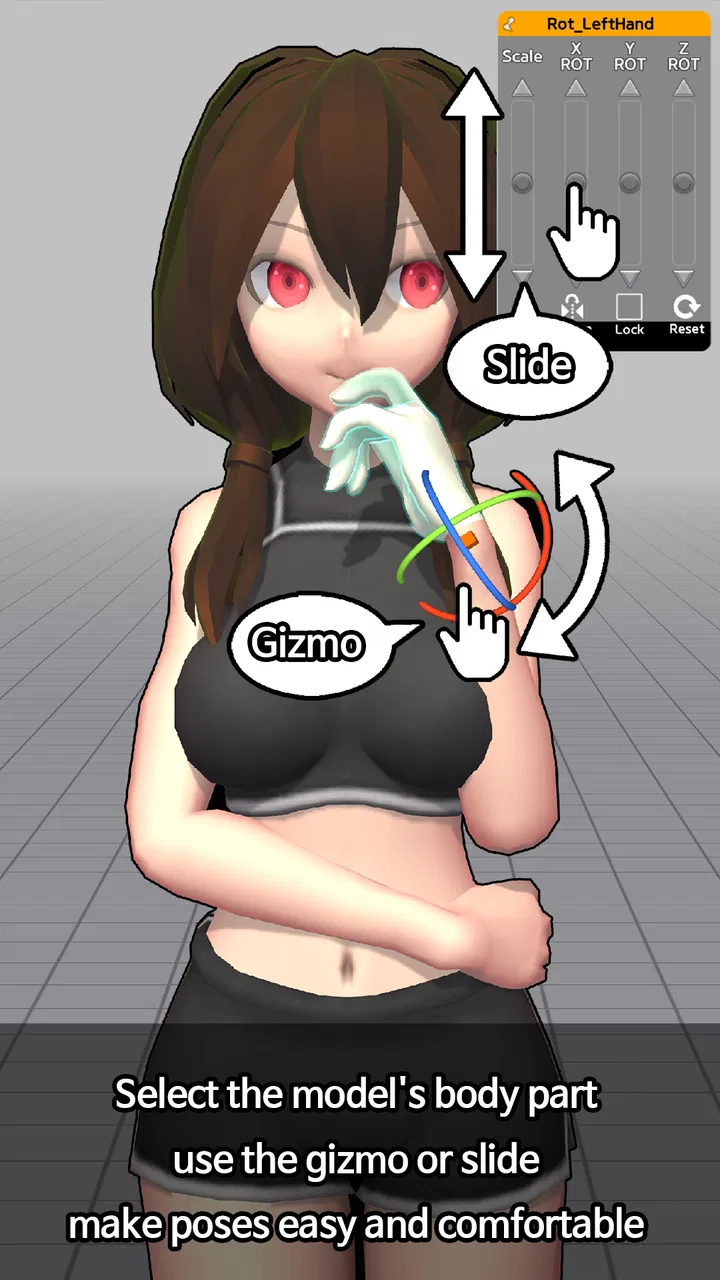
My first impression was practical rather than spectacular. This is not a replacement for learning anatomy, and it does not magically produce a finished drawing. Its value comes from making the early reference stage less frustrating. I can set up a pose, inspect the body from different angles, and use that arrangement as a starting point for sketching. That simple workflow is the reason I kept returning to it during the first week.
The app is free to install, carries a Teen content rating, and has reached over ten million installs. Its average rating is 3.6 from around ninety-seven thousand ratings, which tells me that it has a broad audience but also some real points of friction. That mixed reception feels fair: the concept is useful, but the experience depends heavily on whether you enjoy adjusting a digital mannequin instead of grabbing a ready-made image.
You May Also Like

 Blood Strike: 2.5 Anniversary
Blood Strike’s Loadouts Turn Every Drop Into a Tactical Gamble
A close look at Blood Strike’s custom loadouts: how fast access to signature weapons reshapes its battle royale rhythm, rewards preparation, and narrows the gap between fights.

 Pandora - Music & Podcasts
Pandora’s Music Is Easy to Start, but Harder to Recover
Pandora’s strength is its low-effort path from a seed to a station. Its weak spot is how much confidence it asks you to place in connection, setup, and quiet recovery.

 8 Ball Pool
 Is Built on Rivalries, Rematches, and Routine
A close look at the rivalries, rematches, shared routines, and unanswered safety questions that turn a quick pool match into a persistent mobile community.

 Samsung Music
’s Quiet Strength Is Playing What You Already Own
Its reach comes less from spectacle than from dependable access to a personal library. That simplicity is both the app’s strongest retention engine and its ceiling.

 AccuWeather: Weather Radar
AccuWeather Review: A Quick, Clear Forecast for Everyday Decisions
For everyday plans, the best forecast is the one you can understand quickly. AccuWeather makes rain timing, radar, and local conditions easy to act on, with a few trade-offs.

 Hill Climb Racing
Why Hill Climb Racing Still Turns Crashes Into One More Run
A tiny car, a bumpy hill and one more upgrade: Hill Climb Racing keeps resurfacing because its simple chaos makes every near-miss feel personal.
More From Our News Desk
View All News


What makes the first week enjoyable
The strongest early use case is a short drawing session where I know roughly what I want but cannot find the right reference. A seated character leaning forward, a person twisting at the waist, or a figure viewed from below can be surprisingly difficult to locate in a normal image search. With a pose-making tool, I can build the general arrangement myself and then draw over the structure rather than guessing from memory.
That distinction matters. Easy Pose is most helpful before the illustration becomes detailed. I use it to check the direction of the spine, the angle of the shoulders, the position of the hips, and the relationship between the limbs. It is particularly useful for catching a pose that feels impossible even though the individual parts look acceptable. A quick turn of the model can reveal that the torso is facing one way while the pelvis is unintentionally facing another.
I also found it useful for thumbnail planning. Instead of spending ten minutes refining a face or costume on a weak gesture, I can establish the overall action first. For comic panels, character sheets, and dynamic sketches, this saves more time than a polished reference would if that reference does not match the intended movement. The app works best as a rough construction aid, not as the final authority on how a body should look.
A less obvious benefit is that it encourages me to separate pose problems from drawing problems. If the reference looks convincing but my sketch does not, I know I need to work on observation or anatomy. If the reference itself looks stiff, I can adjust the arrangement before wasting time rendering. That makes practice more deliberate, especially for beginners who often cannot tell whether a weak drawing comes from poor proportions or an unconvincing starting pose.
A useful workflow for drawing sessions
My preferred routine is to begin with a broad gesture rather than immediately chasing perfect limb placement. I first decide where the action line travels, then use the model to check the balance of the torso and legs. Once the pose reads clearly, I make a quick sketch and return to the app only when a particular joint or angle becomes uncertain. Keeping the reference open continuously can become distracting, while checking it at key stages keeps the drawing in charge.
Another practical habit is to create several variations of one idea instead of polishing the first arrangement. For example, if I am designing a character reaching for something, I compare a straight-backed version, a version with a stronger hip shift, and one with a more exaggerated shoulder angle. This turns the app into a thumbnail tool rather than a mannequin I feel obliged to copy exactly.
That approach also exposes one of its limitations. A posed figure can show structure, but it does not automatically communicate weight, personality, fabric behavior, facial expression, or believable muscle tension. I still need real photographs, life drawing, anatomy study, or observation from people around me. Easy Pose gives me control over the skeleton-like arrangement; it does not replace visual understanding.
Who benefits most from it
Beginners are likely to get the clearest immediate benefit because the app gives them something concrete to inspect. Instead of imagining how a body turns in space, they can rotate the reference and study the relationship between visible and hidden forms. Students practicing gesture drawing can also use it to test whether their construction lines follow the pose rather than merely outlining a static body.
It is equally useful for hobby artists who draw original characters and repeatedly struggle with unusual angles. If I am designing a figure from a low viewpoint or planning a pose that is not easy to photograph, constructing a reference is faster than waiting for inspiration. The app can also help writers and storyboard artists who need to think visually but do not consider themselves strong illustrators.
More experienced artists may find it valuable as a checking tool, but probably not as their only reference source. Once I already understand anatomy, I notice the simplifications more quickly. I want the model for proportions and perspective, then I bring in photographs or my own observation for surface detail and natural movement. That makes it a supplement rather than a complete studio solution.
Whether it still earns space after the novelty
I look at the question of keeping Easy Pose installed through a practical lens: does it solve a recurring drawing problem, or does it become another tool I open out of habit? The answer depends on how often I need to invent a pose rather than find one. That distinction leads naturally to the broader question of who can comfortably use its workflow in different settings.
The month-to-month value depends on repetition
After the initial curiosity fades, the app has to justify its place through recurring problems. In my experience, it does that when I use it for projects with repeated characters or difficult camera angles. A single illustration may only need a few minutes of reference work, but a sequence of panels can benefit from having a consistent way to check poses and proportions.
The recurring value is strongest when I treat it as part of a drawing process. I can begin with a pose, make a rough sketch, revise the action, and then use the reference again for a difficult hand, knee, or torso turn. That cycle is more useful than opening the app randomly and browsing for inspiration. Without a specific drawing task, the experience can feel like arranging a mannequin for its own sake.
This is also where the app compares favorably with the usual alternatives. Image searches are faster when I need natural lighting, clothing, facial emotion, or a real sense of weight, but they are often poor at matching an exact pose. Stock reference libraries can offer more polished photography, yet they may not show the viewpoint I need. A physical mannequin is helpful for basic form, but it cannot be adjusted as quickly for a sequence of different actions. Easy Pose sits between those options: more controllable than a photo search, less realistic than a real person, and more convenient than repositioning a physical model.
That trade-off should guide the purchase decision. If my work depends on realistic anatomy, folds, lighting, or expressive acting, I would choose photographs or life drawing first. If my main obstacle is arranging a body in space, the digital model is more directly useful. The app earns long-term value when that second problem appears regularly.
Small techniques that make it more useful
One technique I recommend is checking a pose from an angle different from the one I plan to draw. Looking straight at the intended view can hide depth mistakes. A side or three-quarter inspection often shows that an arm is too long in perspective, that the pelvis is not supporting the torso, or that both feet are carrying equal weight when the pose is meant to be relaxed.
I also use the model to test silhouettes before details. I reduce the drawing mentally to the outer shape and ask whether the action still reads. If it does not, adding clothing, hair, or props will not solve the underlying problem. This is a simple but valuable discipline because the app makes it easy to focus on joints while forgetting the overall design.
A third useful approach is to exaggerate the pose slightly in the reference, then moderate it in the drawing. Digital models can look rigid when every joint is placed neutrally. A stronger tilt or clearer bend can help me understand the intended movement, even if the final character needs a softer, more natural version. This is especially handy for gesture practice, where clarity is often more important than mechanical accuracy.
For consistent character work, I would not assume that one pose reference automatically guarantees consistent proportions. I still compare head size, torso length, and limb relationships across sketches. The app helps me stage the body, but my own model sheet or proportion guide remains important. That is a key long-term lesson: convenience should not replace a personal reference system.
Where the maintenance burden appears
The main maintenance burden is mental rather than technical. Every custom reference requires decisions. I need to think about the action, adjust the body, inspect the result, and decide whether the pose actually communicates what I intended. When I am tired or working under a deadline, that setup can feel like another task before the real task begins.
This is why I would not open it for every drawing. For a simple standing character, a quick gesture from memory or a normal photograph may be faster. The app becomes worthwhile when the pose is specific enough that guessing would create corrections later. Knowing when not to use it is part of getting value from it.
There is also a learning curve in translating a three-dimensional reference into a convincing two-dimensional sketch. A beginner may expect the model to solve perspective automatically, but the artist still has to simplify forms and understand what is hidden behind the visible surfaces. The first few sessions can therefore feel slower than drawing from a familiar photograph. The payoff comes with practice, not instant automation.
The current version is 1.6.10 and it runs on Android from version 5.1 onward, making it accessible on a wide range of devices. The app is free, although individual in-app purchases range from $2.99 to $12.99. That pricing detail matters because the free starting point makes experimentation easy, while anyone considering paid additions should first decide whether the pose-building workflow has become part of their regular routine.
What may cause fatigue over time
The biggest source of fatigue is repetition without a clear artistic goal. Adjusting a model can be satisfying during the first few sessions, especially when the novelty of exploring angles is fresh. Eventually, however, I notice the same basic limitation: a digital figure can show where the body is, but not necessarily how the body feels. If every drawing begins and ends with the mannequin, the results may become stiff or overly dependent on the reference.
Another possible frustration is the gap between technical control and visual appeal. A pose can be physically arranged yet still look boring. The app cannot decide whether the character should lean into the movement, pause before an action, or use an asymmetrical gesture that creates personality. Those choices remain artistic decisions. I get better results when I use the model as scaffolding and then deliberately break away from it.
It may also be the wrong choice for someone who mainly wants finished art assets, automatic character generation, or a large collection of ready-to-use illustrations. Easy Pose is a construction aid. It asks me to participate. Users who prefer selecting a polished image and drawing directly from it may find a reference library more efficient.
Likewise, artists focused on detailed anatomy should treat the app cautiously. A simplified figure is useful for proportion and placement, but it cannot teach every anatomical landmark or show how muscles change under tension. For that work, anatomy books, reputable courses, photographs, and observation provide richer information. The app can support those resources, but it should not become the only one.
My long-term verdict
I think Easy Pose deserves lasting space for artists who regularly face pose, perspective, and composition problems. Its first-week appeal is easy to understand, but its long-term value comes from a narrower and more practical role: it helps me construct a reference that matches the drawing I am actually trying to make. That is more useful than endless browsing when the pose is unusual.
At the same time, I would not recommend keeping it open by default for every project. The best habit is selective use. Start with your own gesture or idea, bring in the model to test structure, and then return to observation and drawing. That keeps the app from flattening your style or turning every character into a posed mannequin.
MadcatGames has made a focused Art & Design tool rather than an all-purpose drawing package. Its free entry point makes it easy to try, and its large install base shows that the problem it addresses is familiar to many artists. The middling average rating also serves as a useful reminder that controllable references are not automatically effortless references.
My recommendation is therefore conditional but positive. If you draw original characters, comics, storyboards, or studies and often think, “I know the pose I want, but I cannot picture it clearly,” this app is worth adding to your workflow. If you mainly need natural movement, expressive faces, clothing detail, or finished visual inspiration, use photographs and life observation instead. The lasting value is not in endlessly posing the model; it is in using it briefly to remove a specific obstacle from your drawing.
FAQs for Easy Pose - 3D pose making app
01What is Easy Pose and how does it work?
Easy Pose is a versatile 3D pose creation app designed for artists and animators to visualize and create human poses. It offers a range of customizable models, allowing users to adjust body proportions, angles, and positions. The app provides various tools and features, including multiple lighting options, to help users create accurate and dynamic poses for their projects.
02Is Easy Pose suitable for beginners?
Yes, Easy Pose is beginner-friendly. It offers an intuitive interface that makes it easy for users of all skill levels to navigate. The app includes tutorials and guides that help new users understand the functionalities and tools available. This makes it a great starting point for those new to 3D modeling or pose creation.
03What devices are compatible with Easy Pose?
Easy Pose is compatible with both Android and iOS devices. It requires a device with sufficient processing power to handle 3D rendering. Users should ensure their device meets the app’s system requirements for optimal performance. Regular updates are provided to maintain compatibility with new OS versions and devices.
04Does Easy Pose offer in-app purchases or subscriptions?
Yes, Easy Pose offers in-app purchases. While the basic version is free, users can purchase additional features, models, and tools. These enhancements allow for more detailed and complex pose creations. Subscriptions may also provide access to premium content and regular updates, catering to professional users.
05Can I export poses created in Easy Pose to other applications?
Easy Pose allows users to export their creations in various formats suitable for use in other applications. This feature is particularly useful for artists who want to integrate their poses into larger projects. Users can export images or use them as reference material in their preferred art or animation software.
Pros
- Intuitive interface for easy navigation.
- Wide variety of customizable poses.
- Supports multiple body types and models.
- Realistic anatomy and muscle details.
- Offline usage without internet requirement.
Cons
- Limited free model options.
- Occasional app crashes reported.
- Paid features can be pricey.
- Interface can be overwhelming initially.
- No export to certain file formats.

Easy Pose - 3D pose making app
Gallery